Pages

This is default featured slide 1 title

Lorem ipsum dolor sit amet, consectetur adipisicing elit, sed do eiusmod tempor incididunt ut labore et dolore magna aliqua. Ut enim ad minim veniam. blogger theme by BTemplates4u.com.

This is default featured slide 2 title

Lorem ipsum dolor sit amet, consectetur adipisicing elit, sed do eiusmod tempor incididunt ut labore et dolore magna aliqua. Ut enim ad minim veniam. blogger theme by BTemplates4u.com.

This is default featured slide 3 title

Lorem ipsum dolor sit amet, consectetur adipisicing elit, sed do eiusmod tempor incididunt ut labore et dolore magna aliqua. Ut enim ad minim veniam. blogger theme by BTemplates4u.com.

This is default featured slide 4 title

Lorem ipsum dolor sit amet, consectetur adipisicing elit, sed do eiusmod tempor incididunt ut labore et dolore magna aliqua. Ut enim ad minim veniam. blogger theme by BTemplates4u.com.

This is default featured slide 5 title

Lorem ipsum dolor sit amet, consectetur adipisicing elit, sed do eiusmod tempor incididunt ut labore et dolore magna aliqua. Ut enim ad minim veniam. blogger theme by BTemplates4u.com.

Showing posts with label Internet. Show all posts

Sunday, 1 September 2013

RELIANCE 3G OFFER FOR ALL OVER INDIA

reliance-3g_01


Hi Friends Here is a great offer from Reliance.
All Reliance 3G user will benefited from This Offer.
Reliance has reduces their value of 3G Data Pack.
Now Reliance 3G offer 1GB of data @ Rs. 123.00
2GB @ Rs. 246.00 and 4GB of Data @ Rs. 492.00
This will help all the People all over India to surf  High speed internet.
You can use this Reliance 3G pack with New or Old SIM.

BSNL 3G Hack! Browse Internet at 520 Kbps

hello friends,
here is the hack for the bsnl 3g at a very high speed.follow the following steps for free gprs


Recharge your 2G SIM with Rs 1 to convert it to 3G SIM and use them for free hours
Check the balance by dialing *123#, the message will show that your GPRS free usage is ZERO MB
Now recharge again with Rs 1 to convert in to 2G SIM
Now recharge with Rs 274 for unlimited GPRS usage for 2G SIM
Now again recharge with Rs 1 to convert in to 3G SIM
Thats it You have hacked your BSNL 3G for unlimited browsing check the GPRS free usage by dialing *123# it will show 1250000 MB free usage.
FOR 2G:-
BSNL FREE GPRS WAP SETTINGS:
here is the bsnl wap setting which helps you to download freely and browse freely from your bsnl mobile,it is totally free enjoy using this free gprs trick in your bsnl mobile
save the below given wap settings as your default bsnl settings in your mobile
Name : BSNL GPRS
Homepage : http://wap.cellone.in
Service Type 1 WAP
Gateway IP : 1 10.100.3.2
Port no : 1 : 9209.
•Timeout: NEVER
CSD No.1
User Name1: ppp
Password1: ppp123
GPRS ACCESS POINT SETTINGS :
wapwest.cellone.in
User Name : ppp
Password : ppp123
access the above given settings in your mobile wap settings and browse and download freely from your bsnl its really a amazing free trick found working in bsnl,happy using free gprs trick. 


Another Working Trick-II

BSNL 3G HACK-
First make wap.google.com ur home page

Now go to network settings- select operator selection- select- manually-


Now it ll search 4 opeartors n finally u ll see Bsnl3G at top n all others below.

Now select any other operator except BSNL3G..let it be select Airtel

It ll tell u No Access and ur network ll disappear.

Now again select BSNL3G

Now suddenly press n hold''0'' key
Or open ur web home page

Plze do it first..u hv 15seccs

Now wait after 30secs...voilla...u r now free to browse n download anything..

Use access point as bsnlnet or bsnlwap

Apply d same process again n again..if u r closing web n trying to open again..
Each time it ll cost u 0.01paisa...


Another Trick-III

BSNL 3G HACK-
1). Go to a BSNL outlet n ask for 3G sim
2). Then recharge it with Rs. 120 in which u ll get Rs 20 balance & 6 month validity
3). Then convert it to 2G by recharging it with Rs. 2
4). Then activate Unlimited GPRS plan for 2G on ur card by recharging Rs. 274(or plan in which u get unlimited acc. to your state)
Now in ur Handset
set access point as bsnlnet
n now use unlimited GPRS with speed of 3G.
so friends enjoy hacked 3G with g8 speed. 

Thursday, 29 August 2013

Reliance 3G HighSpeed Proxy Trick May 2013


U All InJoy This Free Site??? - Any Problem Commenet Here Its Free.... So, Don't Hesitated.
Reliance New 3G Hack Or, Trick -->>

Create A New Settings:
APN : rcomwap
IP Address : 10.239.221.22
Port Number : 8080
Homepage : Wap.google.com
Here is settings for Different APN working with Reliance.
1. rcomnet – Just write APN as rcomnet and leave everything as default. No proxy and port needed.
2. rcommms / rcomwap – APN– rcommms (No disconnection) or rcomwap
(disconnects after every 9 MB)
Proxy no – 10.239.221.22 or­ ­ 10.239.221.5
Port no- 8080

Working In Gujrat 100% --- Try Your State Or, City

Airtel Free GPRS Trick July 2013


Hi Friend's,
I Hope You Are Daily Visiting My Website http://amazingtricksb4u.blogspot.in/

Today I Am Again Back With Latest Airtel Free GPRS Trick.


Follow Below Instructions:-
  • Proxy:- 133.15.11.52
  • Port:- 80
  • Apn:- airtelgprs.com
  • Homepage:-  www.google.com 
Note:- Now Save The Settings, And Restart Your Mobile Phone.
Use This Trick @ Low Balance.

Aircel Free GPRS Trick July 2013


Hello Friend's,
Today I Am Again Back With latest Aircel 3G Free GPRS Trick.

Don't Forget To Like http://amazingtricksb4u.blogspot.in/ For Latest Tricks Updates.

Follow Below Instructions:-
  • Proxy:- 99.567.67.87
  • Port:- 8080
  • Apn:- aircelweb
Note:- Now Save The Settings, And Restart Your Mobile Phone.
Use This Trick @ Low Balance.

IDEA 3G Free GPRS Trick July 2013

Good Morning Friend's,
Today I Am Again Back With latest IDEA 3G Free GPRS Trick.


Don't Forget To Like http://amazingtricksb4u.blogspot.in/ For Latest Tricks Updates.

Follow Below Instructions:-
  • Proxy:- 515.51.15.55
  • Port:- 8080
  • Apn:- internet
Note:- Now Save The Settings, And Restart Your Mobile Phone.
Use This Trick @ Low Balance.

12 Free Websites To Download Youtube Videos In 3GP For Mobiles


 Although YouTube has the option of viewing videos online, still many of us feel more comfortable downloading them. This is because you may not get good speed while viewing videos online. It is suggested to download YouTube videos in 3GP to enjoy uninterrupted and good quality videos. Whether you want to download a video for a one-time watch or are fond of making a collection, downloading them in 3GP is the best option.
Below mentioned are a few websites
That help you download the YouTube videos in 3GP:-

Savevid
Savevid helps you download your favorite YouTube videos in 3GP format. This website also gives you a choice of selecting the quality of the video you intend to download, for instance there is an option of high quality, low quality and medium quality. Choose the picture and sound quality you want. You can also download YouTube videos in MP4 and FLV formats from this website.


KeepTube

This is another site that enables you to download YouTube videos in the 3GP format. The downloading process is smooth and the picture quality you get is quite fine. You can also download videos in MP4 and FLV formats from this website.

KeepHD

This website allows you to download YouTube videos in 3GP format. You can also watch these videos online. These videos can be downloaded in the FLV as well as the MP4 format. Though you can download YouTube videos in the 3GP format from this website, however it is said that the picture and sound quality of the videos downloaded in this format is not very fine.

Gazzump

You can download 4 videos per day from this site if you are not paying for the account. YouTube videos can be downloaded in 3GP as well as MP4, MP3, WAV, FLV and various other formats from this website.
YouTubeKeep
Similar to the other websites mentioned above, even this website allows you to download YouTube videos in 3GP format. Apart from this, you can also download videos in the MP4 and FLV formats.

Zamar

Zamar enables you to convert your YouTube video into 3GP format. However, unlike the other websites, you can’t download them by just clicking at the link. On making a download request you would be asked to provide your email id. You would then receive an email with the download link. From this website you can also download a YouTube video in various other formats such as RMVB, MP4, etc.

Cupish

This website also helps you download YouTube videos in the 3GP format. However, this site is only available on the mobile. This is the reason why bigger videos cannot be downloaded from Cupish.com.

Vixy

With this website also you can download YouTube videos in 3GP. However, this site supports 3GP format only for Mobiles. You cannot download YouTube videos in 3GP format on your PC, using this website.

Savetube

The Savetube website also allows you to download YouTube videos in the 3GP format. This site also gives multiple quality options. You can select the one that you think would suit your requirement.

Clipnabber

If you wish to download YouTube videos in 3GP format, Clipnabber is a good website to accomplish this task. All you need to do is to type the YouTube video URL on this site. This site also works for some other websites such as dailymotion, metacafe, etc. It allows downloading videos even in other formats such as MP4, FLV.

Icyvideo

This is quite similar to the one mentioned above. The Icyvideo website also gives the option of entering the YouTube video URL for downloading the video. You will get the option of downloading the YouTube videos in 3GP, MP4 as well as FLV format. You can choose the one you want. Using this site, you can download videos available on certain other sites as well.

Tubeminator

This website also gives the option of downloading YouTube videos in the 3GP format by entering the YouTube video URL.

Wednesday, 21 August 2013

Free Reliance Latest GPRS & 3G Tricks July 2013

Due to high users request, today we are posting new fresh free reliance GPRS tricks.
Now days many tricks not working, some working but effective in some states only..
We always take hard work to provide you working trick, but some tricks are not working in all states.
As i promise to some users to give you reliance working free GPRS trick as early as possible, so the time comes.. Today i am giving working trick of reliance in many states.


JUST FOLLOW BELOW SIMPLE STEPS:
Step:-1) Make sure your balance is less than 1 .Rs (It is safe)

Step:-2) Make As Below New Setting In Your Mobile

Step:-3) APN: rcomwap

Step:-4) Proxy: 131.141.51.19

Step:-5) Port: 80

Step:-6) Homepage: http://google.com

Step:-7) Now Save The Settings And Restart Your Mobile.

 ALSO READ Free Unlimited Calls from your PC

ALSO READ HOW TO CHECK INTERNET BALANCE IN RELIANCE


 Comment below if it is work in your state..

Tuesday, 23 July 2013

Vodafone 3G VPN Trick May Confirmed Working , 2013


Hello Guys,
Sharing with u New VodaFone Trick . 100 % Working .


!!Confirmed Working Fine in Delhi and Other states too !!

You can check in Your state.

Features...

1.Use in Rs.2 Balance (No Need of any plan)
2.No Disconnection Problem is there .
3.Based on Fastest  Protocol Speed Upto- 500 KBPS+
4.No speed capping
5.No sim blocking
6.Works on blocked sim also
7.Registration Required (Register on Kebrum VPN Official site)
8.100% Working in Northern states of India
9.Supports HTTPS and HTTP protocol
10.Certificate Error Solved
11.Working Both in 2G (GSM) and 3G (UMTS) Mode
12. Apn : www (Try @ zero Delhi users) or portalnmms


Steps ...

1.Download The Attachment (BELOW)
2.Install NMD VPN
3.Windows 7 and Windows 8 Users RUN NMD VPN as the Administrator
4.Just Connect and Enjoy...

TO DOWNLOAD- CLICK HERE

                                                 Password for .rar : voda

Friday, 5 July 2013

Reliance 3g hack 2013

Gprs Tricks for Reliance mobile @ January month,2013-FREE

Hi,there are many gprs tricks coming which some of are working fine and few of them aren’t working.-Due to the spreading of this kind of tricks,the officials from the respective operator bans or block the loop hole ,so the tricks expired.

This is the Working Tricks for November ,that we’ve found in some forums.

Free gprs for Reliance First Trick:
Follow the below simple steps and check it,ll work fine ,post your comments.

Just Create New Settings :

Apn – Reliance.
Proxy – 190.90.36.191
Port – 8000
Home Page – www.google.com

#2 – Free GPRS Tricks For Reliance Mobile
Here is the second tricks for Reliance users to use free gprs to browse free ,you know the speed is great,try this tricks and post your feedback.

reliance 3g Trick

This Trick is Default Browser Trick

Use Settings :

Apn – rcomwap
Proxy – 10.239.221.5
Port – 8080
Home Page – http://0.facebook.com.genius.p.gp or
http://cms.wdsap.ricinfo.com.genius.p.gp


Thats it,you can browse free from your reliance mobile.

The Top 25 Fun Google Tricks

Maybe to help dispel the wacky notion that geeks are boring, or maybe to prove that Search isn’t all work and no play and Sergei and Larry are by no means dull boys, Google every-once-in-a-Google-Moon leavens their spam-fighting and user experience-enhancing with some honest-to-goodness, good clean Fun Google Tricks.

funny google gravity trick


1. Google Gravity
Quite simply, this is Earth-bound physics “infused” into Google’s interface: with “gravity,” the visual elements you commonly find on the interface, such as the search bar, the “I’m feeing lucky” button, and everything else fall down like a stack of bricks on the bottom of the browser. You can even “pick up” and “throw” the search results at the “walls” or just simply mess with them. This is no longer implemented on Google, but you can still see how it worked through the link below.


2. Let me Google that for you
LMGTFY or Let Me Google That for You is a somewhat tongue-in-cheek service made for those of us who are too lazy to use Google. Upon entering a search query, instead of results, you get a link that you can then mail to your lazy recipient.

Clicking on the link launches the actual search: thus, in this perigrinatory manner, you have Googled it for them. All they have to do is click the link. A beautiful example of technology making things more complicated for us.

3. Google Chuck Norris
There was a time when the internet raged with all imaginable Chuck Norris jokes. So naturally, Google itself dipped its hand in the meme with the Chuck Norris Google Trick. Search “Chuck Norris,” and Google returns a familiar Chuck Norris joke: “Google won’t search for Chuck Norris because it knows you don’t find Chuck Norris, he finds you.”

4. God on Google Earth
Sometime in 2010, people around the world went “God crazy” when Google Earth supposedly had taken a “snapshot” of “divine beings” while crossing a mountain zone in Switzerland. There’s no definite answer, of course, but the buzz it created was testament to how the entire online community could get excited over a blurry photo, like they do with pictures of cats.

5. Google Pac-man
A treasure-trove of fun Google tricks won’t be complete without mentioning Google’s Pac-Man doodle. On May 22, 2010, the 30th anniversary of the classic game, people around the world woke up to a search engine sporting an actually playable mini-version of Pac-Man. And naturally, hundreds of millions of people spent hours playing the game, basically slowing down productivity to a halt.

6. Google Mirror
This fun Google trick simply displays a mirror image of everything you might see when doing a search on Google.

7. Google Hacker
Those who are familiar with the so-called language of hackers (1337 5p3@k or “leet speak”) may love using this Google trick to amuse haxor pals or confound the squares. Sure, the trick isn’t much trickier than  swapping letters for moderately analogous numbers or ASCII characters — e.g. “G” becomes “6″, “E” becomes “3″, “N” becomes “||”, etc — But it’s still fun symbol-play, and still somehow feels like a secret language, despite that we all now w00t every time we are overcome with joy.


8. Google Barrel Roll
A Fun Google trick that is still accessible today, the barrel roll means exactly as it says: make Google do a barrel roll. Simply type “Do a barrel roll” into the search bar and Google dutifully obeys. Warning: This Especially Fun Google Trick is known to make babies cry and grown men squeal with delight.


9. Google Rainbow
Like a handful of the other Fun Google Tricks included in this list, this third-party website that has no official affiliation with Google but only offers its two cents in letting people experience the search engine in a delightful way. If you like colors, this site delivers it—although it may remind you more of the internet circa early-1990s, with all its animated GIFs.
10. Google Sphere
Google Sphere turns every little element you commonly see on Google’s homepage into a swirling “sphere.” It’s pretty cool, but it’s no longer implemented on Google. To see how it once worked, just visit the link below.

11. Google Spam
Probably not an actual Google trick but more a manifestation of how Google offers users related information. In the folders in your Gmail account, you usually see a one-line text advertisement from Adsense. But in the Spam folder, what you’ll see is a real Spam recipe—yes, it’s a recipe for something you can actually eat.

12. Google Tilt or Askew
Typing the word “tilt” or “askew” on Google (specifically if you’re using the Chrome or Safari browser) commands the search engine to “tilt” the whole screen slightly to the right.

13. Dragon Slayer
Those who use Google Docs will find this mildly amusing. If you create or open any spreadsheet, pressing Shift+F12 pops up a message that says: “Dragon slain! Congratulations, you’ve slain the dragon! ]B=8}”.

14. Google Ninja
Who doesn’t love ninjas? Google definitely does. If you’re using your Google Reader feed, press the keys “up, up, down, down, left, right, left, right, B, A” and a ninja (or a couple of them) appear!

15. All the Google Doodles
Over the years, Google has released several of its “doodles”—a temporary re-design of the Google logo made as a tribute to a historical event or the birthday of someone who has changed the world for the better. Through the link below, you’ll find all of the Google Doodles, not only the American versions.

16. Recursion
Type “recursion” into the Google search bar and Google in return asks, rather recursively: “Did you mean recursion?”

17. Google’s Nessie
Use the beach theme with your iGoogle homepage, then very patiently sit there and wait until the clock strikes 3:14 AM. Or you can just more the clock forward and see the monster” that comes out. If you actually waited several hours until 3:14 AM, finally seeing the monster might not totally amuse you.

18. Flight Simulator
What started as an Easter egg became so well-loved that Google eventually turned it into a regular feature of Google Earth. Just click Tools > Enter Flight Simulator, and you’re off to make a round-the-world tour. It would have been more awesome if Google Earth also has a “rocket launcher” feature with unlimited ammo to go with it, but maybe next time.

19. Google MentalPlex
One of the earliest (if not, the earliest) Google April Fool’s joke (this one surfaced in 2000) is the Google MentalPlex. Instead of typing their queries into the search bar, unwitting users were “invited” to just “think” their questions while gazing intently into the MentalPlex circle (apparently to allow Google enough time to “read” your brain signals and transform them into actual search engine queries), then click into the circle to see the results. Even Google’s CEO and co-founder Larry Page called MentalPlex “a quantum leap in finding what you are looking for on the Internet. Typing in queries is so 1999.” It was fun. Especially if you remember that this was the early days of Google, long before the billion-dollar behemoth called Adsense and what-have-you.

20. Google Anagram
Step 1: Type “anagram” into the Google search bar. Step 2: Google asks if you in fact mean “nag a ram.” Step 3: Proceed to LOL.

21. The disappearing “OO”
This is not really a Google fun trick per se, but you can wow your clueless friend with this little “magic.” Click anywhere on the white space of the Dark Arts page (URL in linked title above), then pretend to rub your two fingers on the two OO’s on the Google logo for 2 to 3 seconds, and the O’s will vanish. To bring it back, do the same thing: Click anywhere again and the OO’s will reappear, after which you will be redirected to the real Google.

22. Annoying Google
The “Annoying Google” trick is not really annoying under normal circumstances. Even if you’re in a hurry, Annoying Google’s way of messing up the words as you type them (randomly changing from upper-case to lower-case) is not really annoying. But if you want to see this in action and determine for yourself if it’s really annoying or simply mildly amusing, visit the link below.

23. Epic Google
Epic Google is Google on steroids — not the enhanced performance however, just the obscene bulk. Once the page loads, the logo, search bar, “Search” and “I’m Feeling Excessive” buttons, all swell until they either float off the page or you type a search and get the heck outta there.

24. Weenie Google
Weenie Google is the flip side of Epic Google. Once the page loads, the logo, search bar, “Search” and “I’m Feeling Inadequate” buttons,immediately begin to shrink to inscrutable and barely-usable sizes. Is fun, no?

25. Chicken Rolling
“Rick-rolling” is a popular prank that involves redirecting the unwitting user to a video of music artist Rick Astley singing one of his hit songs (most often “Never Gonna Give You Up”). Chicken-rolling, on the other hand, is like Rick-rolling, but with one dancing man eating fried chicken legs. To subject your unwitting friend to this prank, type the code “2204355” then click “I’m feeling lucky.” See what happens.

All USSD Codes For All Networks


Aircel, Airtel, Reliance, Bsnl, Vodafone, DoCoMo, Idea All USSD Codes


Hi Frnds today I Am sharing a very impotant and useful Ussd codes ( Unstructured Supplementary Service Data) of few main networks like reliance,aircel,docomo,airtel,idea,vodafone. Ussd code that all of us need sometime and as there are so many ussd code and we can't memories all so guy we simply putting all at one place so that whenver you want then you simply checkout our blog and use these below given ussd code......

HOW to use USSD code ?

to use this code , press CALL Green button.

Aircel USSD Codes -


Aircel Customer Care Number - 121 or 123
Your Aircel Number - dial *131# or *1#
Balance Check - *125# or BAL to 121
Local Mobile Calls Balance - *111*4#
Internet Setting - PI to 121 or ALL to 121
Check GPRS Balance - *126*4# or *126*1# or *301#
3G Activation - START 3G to 121
Switch Off - *21*904#
DND Service - DND to 1909
Rate Cutter - 1215 or *122#
e-Recharge - *124*(your aircel number)#
Value Added Service - 1214
IMIS no - *222# or *2# or *214#
Aircel free 3G Service - *122*5*1# or *122*456# ( 6 am to 9 am IST till 15th May)
Aircel Free Hellotune - UL to 5800000 ( not confimed )
Free Sms Message Center No - +919808932698 or +91905063222 or +919050563221
Balance Transfer - *122*666#

Airtel USSD Codes -


Airtel Customer Care Number - 121
Airtel Voucher :- *101*your voucher card no#
Know your mobile number - *282#, *121*9# ,  *140*1600#,  *400*2*1*1*0#*121*9# , *121*11# for 3G,  *121*11# for 3G &, Just send a blank sms to 59103.
Airtel Complaint no - 198
DND Service - dial 1909 ( Activation or Deactivation )
Balance Check - *123#
Mobile Office Activate or Deactivation - *567#
Airtel Gift Service - *141#
To check Airtel 2G data balance :- Dial *123*10#
To check Airtel 3G data balance :- Dial *123*11#
Twitter Service - *515#
Facebook service - *325#
Daily pack 2G internet  - *555*2#
Recharge - dial 123
Airtel live Setting - LIVE to 52567
Gprs Packs - MRP GPRS to 51619
Mobile Portability - PORT to 1909
3G Activation - 3G to 121
Airtel Callertune Trick - 543211888

Balance Transfer - *141# and Choose Options.
Receive Airtel Live Settings :- SMS LIVE to 52567receive Airtel Live Settings :- SMS LIVE to 52567
To Stop any services - SMS STOP to 121/1210
To Start any services - SMS START to 121/1210

Reliance USSD Codes -


To know Mobile Number : *1#
To Check balance or validity period : *367# ,*333*1*1*1#, *306# &, *702#
Special Packs :- *777#
Caller Tunes – *999#
Packs :- *123# , *321#
Latest Balance information :- *333*1*2*1#
VAS balance :- *333*1*4*1#
Activate Caller Tune :- *333*3*1*1#
Deactivate caller tune :- *333*3*1*2#
Local Call balance :- *367*2#
common access no. or admin menu :- *369
GPRS data balance :- *367*3#
GPRS data balance for check type :- "MBAL" and send to "55333" ( don't put -- " " )
Reliance customer care :- *333 , *369
Activate Miss Call alert :- *333*3*2*1#
Deactivate Miss call alert :- *333*3*2*2#
For GPRS setting :- "ALL" to "55100"
Reliance Voucher :- *368# or *305*14 digit pin# and call info 58401

Free Internet :- *123*099#


Bsnl USSD Codes -


To know your Mobile Number - Dial 164 and call or *8888#
Balance and validity details - *123#
GPRS data balance check - *123*10#
SMS local - *123*1#
National sms - *123*2#
Network call - *123*5#
Local network call - *123*6# (data bal check for UP)
Night GPRS pack - *123*8#
Video call bal - *123*9#

Customer care Eastern region - 9400024365
FnF Numbers Enquiry - Dial *124#
SMS Balance Enquiry - Dial *125#
Voice Packs Info - (RC200) : *126#
Last Call Charge Details - *102#
Data Balance Enquiry - *234#


Vodafone USSD Codes -


Vodafone Customer Care Number - 111 or 198 (Complaint No)
Main Balance Check - *141#
Gprs Balance Check - *141*9# or *111*6#
Know 3G data card balance :- *111*5*2#
Your Vodafone Number - *121*0# or *555# or *8888# or Dial 164 or *111*2#
SMS Balance - *142#
Call Balance Check - *145#
3G Activation - Prepaid-> ACT 3G to 144, Postpaid-> ACT 3G  to 111
Gprs balance data balance :- GPRS to 144
Night GPRS balance :- *123*8#
20 MB 3G plan :- *444*8# (for old plan)
GPRS PACKS-->
1 day GPRS pack - *121*05#
3 days GPRS pack - *121*14#
7 days GPRS pack - *121*25#
15 days GPRS pack - *121*49#
1 month GPRS pack - *121*98#
3G GPRS Packs -->
5GB 1 month 3G - *121*851#
8GB 1 month 3G - *121*1251#
DND Service - dial 1909 then choose option Activation or Deactivation
Rate Cutter - *121*10# and 10 paise per min activated on your mobile.
Hellotune Trick - dial 5525 or 54206090 and select song Activated in your mobile.

Balance Transfer - *131*<Amount><Receiver No>#

Idea USSD Codes -


Idea Customer Care Number - 12345 or 198 (complaint no)
Balance Checker - *123# or *130# or *212#
3G Activation - ACT 3G to 12345
Activated Service For idea Live Tv - 3GTV To 54777
Activated Service For idea GPRS - FRESH To 4666
Deactivated Service For idea Cricket - UNSUB ONDCKTPOR To 55456
Idea Service Number - *147#
Idea GPRS Setting - SET to 54671
Hunny Bunny Hellotune - HB to 56789
Your Idea Number - *100#
Check Mobile Number :- *789# or *100# ( For Karnataka )
SMS Balance - *161*1# or *451#
DND Service - START 0 to 1909 or Call 1909
Balance Transfer - *567*<receiver no><space><Amount>#

Transfer Limit - 10 to 50 Rs.

DoCoMo USSD Codes -


Know Your Mobile Number - *1#
Balance - *111# or call 12525
Internet Balance - *111*1#
Customer Care  121 or 198
1909 or sms START DND to 1909
Recharge - *135*2<Recharge pin>#
Activating daily/weekly/new services/Internet Packs - *141#
More Info - *191# (last 3 recharges , VAS, etc….)
To Activate 3G - ACT3G to 53333

To Know Our No - *580#

Thursday, 4 July 2013

Adobe Reader 11.0.03

Adobe Reader 11.0.03 Screenshot


Download Adobe Reader 11.0.03

Adobe Reader 11.0.03

Adobe Systems Inc - 47.79MB (Freeware)
TO DOWNLOAD THIS SOFTWARE CLICK HERE

Adobe Reader software is the global standard for electronic document sharing. It is the only PDF file viewer that can open and interact with all PDF documents. Use Adobe Reader to view, search, digitally sign, verify, print, and collaborate on Adobe PDF files.

View, print, and search PDF files, including PDF Portfolios and PDF maps
Author, store, and share documents, and share your screen, using Acrobat.com services
Experience richer content and greater interactivity with native support for Adobe Flash technology
Review documents using familiar commenting tools such as sticky notes, highlighting, lines, shapes, and stamps (When enabled by Acrobat Pro or Acrobat Pro Extended)
Digitally sign PDF documents (When enabled by Acrobat Pro or Acrobat Pro Extended)

Monday, 1 July 2013

FREE BSNL 3G / 2G GPRS Trick HACK APRIL MARCH 2013


Hello friends and loyal readers of Amazingtrick, After a long time I'm going to post Free BSNL 3G GPRS Trick which is confirmed working all over the country. Before I start discussing about this trick I want to tell you that you can read other tricks and hacks for other service providers like Idea, Reliance, Tata Docomo , Uninor and BSNL to check out click here.Click on Read More now.


Now without wasting a single minute lets get back to the trick. First of all I want to tell you that all the tricks on this blog are very easy to implement that is why you need not to worry. Today's trick works on proxy setting as the previous one Airtel Proxy trick. It means you have to create a new configuration setting in mobile phone and after that you have to restart your phone.

How to Configure BSNL 3G GPRS Trick :
1. Mobile:-

Create New Configuration Setting in Mobile Phone using following data :
Account Name : Amazingtrick
Access Point Name : celloneportal
Proxy Address : 192.168.87.163
Port : 8080
Homepage: http://wap.yahoo.com or http://http://amazingtricksb4u.blogspot.in/
Save Setting and Restart Mobile Phone. Enjoy FREE 3G GPRS :)

2. PC:-

How to Configure BSNL 3G GPRS Trick 2013 in Mozilla Firefox :

Open Mozilla Firefox and Configure it
Note : You must have active connective using cellopneportal as APN

Go to Menu >> Options >> Advanced >> Network >> Settings >> Manual Configuration

Input PROXY and PORT given below :
Proxy : 192.168.87.163
Port : 80
Set Homepage : wap.yahoo.com
Save Setting and Enjoy!! Free Internet on Computer :)

If you face any issue in setting up BSNL 3G Trick March 2013 bring it to us by commenting.

Saturday, 29 June 2013

Airtel Life Time free internet 2013 for Opera Mini


Today I am going to share with you an important trick on how to use free internet in Airtel  on Opera Mini . Its an important and a rare trick . I will explain you on step by step on its use.


STEPS TO USE OPERAMINI  FOR FREE INTERNET

1. Use Airtel internet or Mobile Office Settings and then download using the following link.

          OPERA MINI 7 MOD by CLICK HERE
2. In Handler Menu -> Network Settings -> Select Real Host

3. Enter Real Host field box enter 203.115.112.5 or
     Select Working Free Home Page for Your State


Now Enjoy Free Internet and don't forget to comment.

Thursday, 13 June 2013

How to Fix USB Device Not Recognized in Windows


Are you getting a “USB device not recognized” error whenever you plug in a USB mouse, keyboard, or other USB device? I love USB and have 5 ports on my computer so that I can connect my mouse, keyboard, camera, phone, and printer to it all at once!


However, last weekend, my computer stopped recognizing my USB devices! The strange thing about it was that the USB ports were not bad because all of my devices were still getting power to them. I could still charge my cell phone without a problem!


So I started with the normal fixing methods, including uninstalling the drivers for my devices and reinstalling them. That didn’t work! Next I tried System Restore thinking that maybe I had installed something and it caused a conflict with the USB system drivers. That didn’t work!

I read online that in order to fix this problem I should go to Device Manager and uninstall all of the devices under USB Controllers. Restarted the computer, reinstalled the USB drivers, but the problem STILL did not go away!

You may also see in Device Manager that the device shows up as an “Unknown Device”.


So how did I finally fix the problem? Well, apparently it’s a super simple solution! No need to edit the registry, uninstall drivers, or anything of that sort.

Simply UNPLUG YOUR COMPUTER FROM THE POWER SUPPLY. Yes that’s it! Note that this does not mean just turning off your computer because modern computers don’t really turn off when you press the power button as the motherboard still gets power.


First to explain, the motherboard is where all of hardware of the computer is connected to, including the USB ports. Sometimes the motherboard needs to be “rebooted” also because something can go wrong, i.e. all your USB ports suddenly stop working. The small microprocessor on the motherboard will reload the drivers and your USB ports should be back to recognizing all devices!

So first turn off your computer using Shut Down or pressing the power button and then UNPLUG it from the wall outlet. Let it sit for about a minute and then plug it back in.

Hope this helps someone fix that pesky “USB device not recognized” Windows error!

How To Hack Saved Password In Firefox ?


In this post i will share with you guys how to view saved password in Mozilla Firefox web browser. This trick can be helpfull if you get your hands on someone computer maybe your friends and he has saved password for certain websites like gmail, facebook,yahoo etc then you can easily view his password with very simple and easy trick that i am going to share today.


For demonstration purpose i have already saved a fake email password for facebook. But it will work on any website. So lets get started.

1. Open Firefox Web Broweser
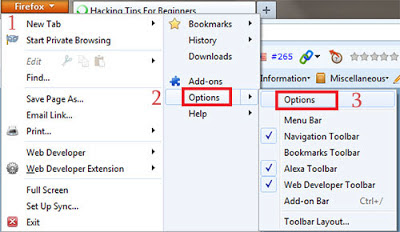
2. Then Click on FireFox > Option > Option as shown in below picture


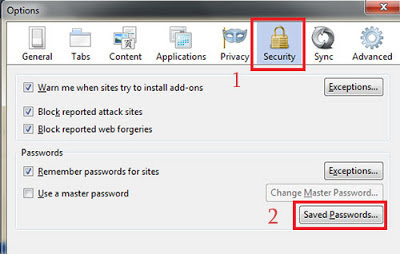
3. Then a POP Up box will appear, In that go to security and click on Show Passwords as show below.


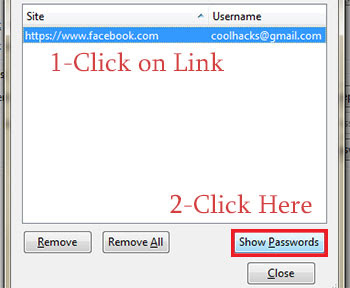
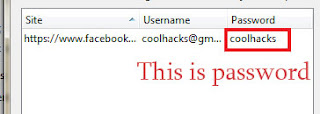
4. Now click on website whose password you want to see ans click on show password as shown in below image. (Note: It will ask for confirmation so click on yes when dialog box appears)


5. Done, You have hacked password of your victim with few simple steps. You can try this at school computer lab if someone have saved their password.

You Have Done By This .........

Get Free Unlimited 3G During 6 AM to 9 AM on Aircel

Aircel has been always ahead in slashing 3G prices. Aircel has came with very competitive and consumer friendly plan for all their services including Data. Still where the other Leading  Operators have Increased data prices by 200% and still Aircel still offers unlimited Data on their packs. and now user’s who are hungry to taste high speed Internet for free or readers who are fed up because no trick is working in their region then It is better to more to Aircel and get this Free Unlimited 3G daily for three Hours. this free subscription will be valid for one month.


Get up early everyday and enjoy your downloading and browsing this summer. follow the below instructions to active this free subscription for one month. the method to subscribe for this Freebie from aircel may differ from circle to circle hence you should get in touch with 121 Helpline for more information.

To get this Service on your Aircel mobile, you need to Run a USSD code ,

Dial *122*5*1# or *122*456# or *122*5#  and you will be receiving  a confirmation message instantly which will denote that your Free 3G in morning hours is activated for a month

Below is the confirmation message which you will receive instantly after dialing the USSD code

Manual Gprs Settings For All Indian Network


Here You Can Find Several GPRS settings For Vodafone, Idea, Airtel, BSNL, Airtel live and lots more.

Manual Reliance Smart GPRS Settings:
Settings for SMARTWAP:
Account Name: SMARTWAP
Access Point Name: SMARTWAP
Home Page: http://wap.rworld.co.in/gsm/index.wml
Wap Gateway Proxy IP: 97.253.29.199
Port: 8080

Settings for SMATRNET:
Account Name: SMARTNET
Access Point Name: smartnet
Home page: http://www.google.co.in
Wap Gateway Proxy IP: 97.253.29.199
Port: 8080

Settings for MMS:
Account Name: RTLMMS
Access Point Name: MMS
Homepage: http://10.114.0.5/mms/
Wapgateway IP: 10.114.0.13
Port: 9401
———————————————————————————————————

Manual Idea GPRS Settings:
Account Name: idea_GPRS
Username: leave Blank
Password: leave Blank
Homepage: http://wap.ideafresh.com
Proxy and Server adress: 010.004.042.045
Port: 8080
Databearer: GPRS / Packetdata
Access Point Name: imis
Internet Proxy: Enabled/yes
Authentication Type: Normal ———————————————————————————————————

Manual Vodafone GPRS Settings:
Account Name: Vodafone Live
User Name: leave Blank
Password: leave Blank
Proxy: Enabled/yes
Access Point Name: portalnmms (Mobile) / www (Pc)
Proxy: Enabled/yes.
Proxy and Server address: 010.010.001.100
Proxy Port: 9401 or 8080
Homepage: http://live.vodafone.in
Authentication Type: Normal ———————————————————————————————————

Manual Airtel GPRS Settings:
Account Name: Airtel_gprs
User Name: leave Blank
Password: leave Blank
Homepage: http://live.airtelworld.com
Proxy: Enabled/yes.
Proxy and Server Adress: 202.56.231.117
Proxy Port: 8080
Data Bearer: GPRS or Packet Data.
Access Point Name: airtelgprs.com
Authentication Type: Normal
Use preferred Access point: No ———————————————————————————————————

Manual Airtel live settings:
Account Name: Airtel_live
Homepage: http://live.airtelworld.com
Username: leave Blank
Password: leave Blank
Proxy: Enabled/yes
Proxy and Server Adress: 100.001.200.099
Access point Name: airtelfun.com
Proxy and Server Port: 8080
Data bearer: GPRS/ Packet Data
Authentication Type: Normal ———————————————————————————————————

Manual BPL GPRS Settings:
Account Name: BPL WAP
Username: leave blank
Password: leave blank
Proxy: Enabled/yes
Homepage: http://wap.mizone.bplmobile.com
Proxy and Server address: 10.0.0.10
Proxy and Server Port: 8080
Access Point Name: mizone
Data Bearer: GPRS/ Packetdata
Authentication Type: Normal ———————————————————————————————————

Manual BSNL North And West GPRS Settings:
Account Name: bsnlwap (North)
Account Name: bsnlnet (West)
Username: leave blank
Password: leave blank
Proxy: Enabled/yes
Homepage: http://wap.cellone.in
Proxy and Server address: 010.132.194.196
Proxy and Server Port: 8080
Access Point Name: wapnorth.cellone.in
Data bearer: GPRS/ Packetdata
Authentication Type: Normal ———————————————————————————————————

AIRCEL GPRS
Account Name–AIRCEL GPRS
Homepage–http://wap.google.com
Username–Blank Password–Blank
Proxy–disabled/no
Accespoint Name–aircelgprs
Proxy and Server Port–8080
Data bearer–GPRS/Packet
Data Authentication Type–Normal ———————————————————————————————————

TATA DOCOMO MANUAL GPRS SETTINGS

Docomo Dive in Account Name– DocomDive
Username–Blank
Password–Blank
Homepage–http://divein.tatadocomo.com
Proxy and Server Port–8080
Proxy and Server adress–10.124.94.7
Databearer–GPRS/Packetdata
Acces Point Name–TATA.DOCOMO.DIVE.IN
Proxy–Enabled/yes
Authentication Type–Normal

Internet Account Name–DocomNet
Username–Blank
Password–Blank
Homepage–http://wap.google.com
Proxy-Disabled/No
Databearer–GPRS/Packetdata
Acces Point Name–TATA.DOCOMO.INTERNET
Proxy–Enabled/yes
Authentication Type–Normal

MMS Account Name– DocomoMMS
Username–Blank
Password–Blank
Access point-TATA.DOCOMO.MMS
home page-http://mmsc/
Proxy-Enabled/Yes
proxy server-10.124.26.94
port-8799
Databearer–GPRS/Packetdata P
roxy–Enabled/yes
Authentication Type–Normal

Vodafone VLIVE UDP Trick 07 March 2013 10000% working


Vodafone UDP trick is once again screwed. The trick is worth and is giving
awesome internet experience even this trick can be configured for the

Android via VPN. This is the UDP trick and is far better than the TCP
one. UDP trick is confirmed working in the North Side. Thanks to
Symbianize for the VPN. There is no SIM blocking or capping limitation.
Just connect the VPN and you are ready to go.


APN and other settings are encrypted and in the same file.
You don’t need to be a Geek for this, simply download this file and connect with the APN
click here